



















11:31 2025-07-29 UTC+2
3220


Universal trading tools for money management on Forex trade

1.2369
1.2366
1.395
1.3947
108.74
108.71
0.932
0.9317
1.2547
1.2544
134.44
134.41
1.1523
1.152
151.66
151.59
1.3
1.2993
1345.84
1345.24
16.96
16.92
240.21
240.19
97.24
97.12
0.8868
0.8865
0.787
0.7867
0.9873
0.9863
48.48
48.45
156.54
156.46


InstaForex offers its clients the widest range of bonuses
You can make use of this bonus every time you deposit your trading account. The amount of the 30% bonus is unlimited. The bonus is credited to every deposit no matter how much you have earned or lost in previous deals. It enables traders to increase the amount of a deal.
In addition to the 30% bonus for every replenishment, all InstaForex Club card holders enjoy privileges such as bonus specials. Their size depends on deposits and withdrawals from an account. The maximum bonus available to InstaForex Club card owners is 40%.
This unprecedented bonus is available for all clients. InstaForex gives you a unique opportunity to get the 100% bonus on first deposit. You just need to open and top up a live trading account and fill in the application form. You can withdraw all the profit from bonus funds without any restrictions.
The trading conditions offered by InstaForex are universal tools for money management on Forex trade. The priority of InstaForex international broker is rendering high-grade investment services aimed at deriving profit from operating on the worldwide financial markets.
InstaForex clients use cutting-edge technologies in online trading.
Daily forex market reviews, trading plan, video analytics, analytical predictions from the leading experts of the currency markets


Best instruments for successful online trading on Forex market


Unique opportunity to apply the most innovative forex trading solutions


Analytical materials — indispensable tool for efficient trading on Forex market


Actual news, analytical video reviews, interviews and reports


Unique opportunity to apply the most innovative forex trading solutions


The most important success indicator of InstaForex is its customer base consisting of more than 7 000 000 traders in 80 countries
I’d like to emphasize the great functionality of Client Cabinet, the smoothly running PAMM and ForexCopy systems, the best affiliate program, and 24-hour online support.
I’ve been cooperating with InstaForex since 2013. I started trading on a real account, and it was successful. I always get immediate assistance in case I have any questions about my account or trading platform. There is a lot of useful information on the company’s website.
I began trading on Forex when I was a student, though I discovered InstaForex a bit later. Thanks to this I had the opportunity to compare and appreciate the work of my present broker. First of all InstaForex really provides the wide range of trading instruments and services. The company gives the opportunity to its traders to trade with futures and this is a real advantage. That is why this is InstaForex that I recommend to my friends!
InstaForex Company is a professional broker on Forex market. I would like to mention a professional approach to law issues and a high-quality work of employees, who create maximally convenient conditions for traders' work. Good luck to you!
I’ve started my cooperation with InstaForex recently. I was interested in educational materials that InstaForex provides to all novice traders on the forex market. Moreover, the company suggests good credit terms. The exhibition ShowFx World enables new traders to extend their capabilities and also get to know the experience of long-term customers. Such events prove the company’s market leadership.
I’ve started working with the company two months ago and I’ve never regretted it! There is all you need: great service, quality analytical reviews, and a responsive team. Besides, the company offers gainful bonuses, contests and campaigns to try your luck at. I think that’s great. I’ve never faced any difficulties with money withdrawal so far. No problem at all! I hope for our further fruitful cooperation!
As everywhere, in trading it is always necessary to improve yourself. If you want to earn steadily on Forex - look for new ways of getting skills and knowledge. InstaForex - is the company investing in its clients. It runs educational courses and open seminars, provides the traders with a wide library of education materials and video-lessons. I'm a participant of InstaForex education projects, I actively communicate with other traders on MT5.com forum.
I have worked with InstaForex for over six months. During this period I have already managed to estimate numerous possibilities which the company offers. The main plus of the company is its dynamics, as InstaForex launches new up-to-date services. I also like the official website which is very informative. To my mind, quick opening and closing of orders is a very significant positive feature. Moreover, bonus program by InstaForex is very important too. The Support Department is always quick and provides correct assistance. The company has modern offices that are well-equipped. The managers of the office are communicative, professional and optimistic. I would also draw attention to advanced analytical reviews on the website of the company and webinars, which are held regularly.
I’m Vasiliy Lutzak. I’ve been working as a trader cooperating with InstaForex for over three years. In the meantime, InstaForex showed itself to good advantage. For example, I really like nice bonuses on trading accounts that the company makes available to its clients. Besides, I approve interesting contests. I’d like to wish InstaForex prosperity and long years of successful performance.
Hello! I’d like to thank the InstaForex Teacher team, particularly Tatiana, for the training they’ve provided. It was very helpful for me as a beginner at InstaForex. I was looking for basic but comprehensive information about working with the platform. Special thanks to Tatiana for explaining the material and being so attentive to beginners. Thank you!
I’ve been trading with InstaForex Company for more than 18 months. I appreciate the low leverage available for trading and instant execution of orders. I wish everybody success and good health!
I work more than a year with InstaForex international broker and still everything suits me well. There are no problems with quotations, account funding, funds withdrawal as it was with another broker company. Aside from this, you can get bonuses for account replenishment. For example, I always use 30% bonus, it is really beneficial without deception. You can fund your account by all possible ways: through bank, through Internet, by means of credit card, cash. It is very comfortable, as you never know where you will be on business and when it will be necessary to deposit account. In general, everything is really made for the traders' benefit, for their comfortable and successful activity. So I'm very satisfied with this broker!
I was cautious choosing the broker and was choosing among different companies. InstaForex is a well-established broker which strictly follows its work rules and always meets the needs of its clients. The company provides the best approach to traders and opens up good relations with each of them. I like the absolute transparency of this broker and readiness to solve any problems of the client. Aside from this, InstaForex provides technical safety at bank level - my account is secured and I can be sure that nobody uses my funds or personal data.
I do work and will work only with InstaForex Company. I like all of it. Above all, I'm imposed upon respectful attitude of the company to clients, it is felt across the board: from a wide range of functions in Client Cabinet to 24-hour technical support. I like that you withdraw funds almost momentary through WebMoney. Great thanks to InstaForex staff for that. I also appreciate the speed of orders opening, because sometimes everything depends on a few seconds. Recently, I have registered as a PAMM-trader and PAMM-partner, it suits me well. Very beneficial conditions, high commissions, a big choice of banners and informers. I'm sure that company will surprise its clients. I would like to wish InstaForex a great success!
I have recently discovered InstaForex Company, my friend told me about it. The responses were very good as well as that information which I have get about the broker. So, since recently I trade with InstaForex. It seems that this broker gives the best conditions for newcomers. In particular, these microaccounts and minimal lot of 100 USD which allows to minimize the risks. I like the contests on demo-accounts - it is very exciting, I can win money for my real account. I hope our cooperation will be fruitful.
Impressions from cooperating with InstaForex are exclusively favorable. A perfect service and reliable capital protection, beneficial offers, fast trades execution, perfect support service - by these and other parameters I do not see any rivals for InstaForex. Recently, I have tried to work in the PAMM-system. I've easily found an experienced trader with high profit level and invested funds in his account. The invested money brought a great profit! PAMM-system by InstaForex differs by its convenience and effectiveness. I hope to rise to a managing trader someday with InstaForex!
To my mind, InstaForex Company is really one of the best brokers in Asia. I like the website where you can find everything the broker offers. In details about each service, a lot of useful information about the company, what makes it tick. And the partnership program sections, technical support, forums are sorted over separate websites. And it becomes clear what the scale of the done work was. It means that people do their job, the company develops. As for me, a well-set permanently up-dated website is the best proof of company's attitude to its clients and brokerage services quality. The most sections of InstaForex website are modernized constantly. There are even a few RSS-feeds that is self-explanatory.
I work with InstaForex for more than a year and I think that it was my luck and it is not only because of the various contests but also because the company offers a good spread and 1:1000 leverage enabling you to trade with quite small initial capital. The company always provides new services to its clients benefit and creates some services by itself, so we can see that people do their job properly. A first-class service is the priority of the company. I know very well that the employees will pay due attention to my problems and deal with them in the shortest term. In general, it is very convenient to be a client of InstaForex company.
I have been trading on Forex for nearly two years. I like working and to be independent, that is why I chose Forex. I had changed several brokers before I started cooperating with InstaForex. I have been working with InstaForex for some time and I make much money. InstaForex broker provides perfect trading conditions, withdrawals and deposits, plus bonuses – and I appreciate it. Work with InstaForex and earn money! I wish good luck to everyone and let the trend will always be by your side!
The best service is ForexCopy. I haven't found a better opportunity to copy successful traders. Affiliate program is also great.
I have been working with InstaForex since 2012. This year I took an educational course. I'd like to note that the company's managers regard educational courses seriously and attentively; they try to explain every aspect and organize individual lessons. The company arranges regularly a lot of contests, there are benefits and bonuses. I like to be with InstaForex Kazakhstan.
I got to know the company two years ago. I really like InstaForex coaches because they tell simply about mistakes and share their own trading experience.
May all raise good profit!
I have been working with InstaForex for about a year. I got to know about the company through the commercial in Econom newspaper. I decided to visit introductory lecture and opened a trading account. I liked coherent and collaborative work of the office. I would like to point at speedy execution of orders and a very good customer support service, as well as perfect system of welcome bonuses and convenience at work with website. To be honest, I have not worked seriously on Forex, but now after ShowfxWorld exhibition I am sure that work with InstaForex will be a top priority for me and it will help me to reach success and prosperity. I would like the company would organize club days more often.
I have been trading with InstaForex for 18 months. The broker knocked me down by the speed of orders’ execution, i.e. by the lack of slippages. Of course, there occur negligible lags, but only on the crazy market. The funds are deposited and withdrawn very fast; all questions are solved instantly as well. Moreover, I would love to mention that education in InstaForex taught me much and I liked the tutor Vitamir, who is the partner of the company. His courses helped me to learn the secrets of trading, and InstaForex Company allowed to apply the received knowledge in practice. I love to take part in the campaigns held by the company. The fact that they are carried out professionally and transparently is the example of qualitative and honest contests’ arrangements.
InstaForex surprises by its innovative approach. The warmth of attitude to each trader, ability to react fast to the questions which arise, rapid development of additional services inevitably puts the company to the leader line on Forex market. Today InstaForex is ahead of many brokers on the trading services market. Moreover, it is oriented to the market of CIS countries what is most agreeable to me, and what allows to name InstaForex one among few.
I can be really very emotional giving my attitude towards the company, but this only underlines the ability of the company to impress.
I have been working with InstaForex about a year and I can say only good things about this broker that proved to be reliable. Most of all I like that, despite my poor English it is very easy to talk to the employees of technical support, as they always maintain respectful communication. InstaForex is an open company that provides the comprehensive information to everyone: you can simply visit the official website. Also you can find a lot of educational materials on the site as, for example, video lessons on working with the terminal. I am a gambler and that is why I like InstaForex contests very much as I can win a monetary reward.
I have co-operated with InstaForex since February 2011. I chose it for top-quality services, for personal approach, and fast withdrawals and deposits to and from the account. I was very pleased by the leverage which is from 1:1000 and, of course, by various contests. I try to visit all exhibitions where InstaForex takes part in order to communicate with the representatives of the company in person and find out the recent news as well as to get consulted. I have been to three exhibitions of the kind in Kiev already.
I have been working with InstaForex Company since 2010. I am very satisfied with the services and conditions for trading. I am very pleased with bonuses. Moreover, InstaForex Company provides various contests on demo accounts to its clients. Such contests give a chance to start trading on Forex without deposits. Withdrawals and deposits work perfectly. I use InstaForex card and withdraw money and I cannot complain. I wish InstaForex Company a flourishing business and big growth.
I was right to choose InstaForex when I came on the financial market as a trader. I consider regular webinars as very helpful. InstaForex personnel and technical support service are really friendly.
I have been working with InstaForex for one year already. I am on Forex since 1995, so a 17-year experience allows me to be sure while confirming that the professional level of the company is fully agreeable with the today’s requirements of a currency market trader.
In 2009 I opened account with InstaForex and I'm satisfied till now. I appreciate my broker for rational spreads, comfortable trading conditions, fast deals implementation and momentary respond to any requests. I think that to this day InstaForex Company is the best one by all parameters. I'm ready to recommend this broker to the newcomers making their first steps on Forex and experienced traders which can open new opportunities with InstaForex.
For six months of working with InstaForex I can say that this broker has never failed me. First of all I would like to mention especially such competitive advantage of the company as bonus programs. I do not know other brokers that provide such big bonuses. InstaForex is particularly known for its reliable staff: employees are always ready to explain clearly and patiently all the details of each service and give a good advice. I like that I can see my statistics concerning the work I have done. I would like to thank everyone who develops the company and makes traders’ life easier.
On instaforex.com I like the following:
It is possible to transfer funds from one deposit account to another at the same company without a commission;
There are numerous currency pairs and other trading instruments;
It is possible to open an account without a spread and swaps.
I was able to appreciate the convenience of the available services and opportunities. I am going to deal definitely with InstaForex.
I have been aware of InstaForex for a year and half since I started listening to webinars by Sergey Belyayev. It is nice that the conference took place in Yekaterinburg. I was able to get to know in person the company’s coaches and ask them any questions. Besides, I am very pleased with interesting contests and great prizes!
I would like the company to turn its careful attention to the Ural region and hold such meetings on a regular basis.
InstaForex Company has the advantage of analytical articles presented by professional analysts – and I use it to my advantage. In comparison with other well-known broker companies, InstaForex does not try to lead traders astray. The company provides first-class services. The Support Department works efficiently. Moreover, InstaForex broker arranges a lot of campaigns and contests both for newcomers and professional traders. In my opinion, InstaForex is the most vibrant company on Forex due to flexible policy and high-quality services.
My work with InstaForex began in 2008. I appreciate that InstaForex keeps up-to-date to provide its traders with the best services such as mobile apps and transferring money between trading accounts. The company has very good products and offers for web-designers. InstaForex is indeed the only company providing quotes API, news, statistics on opened trades, and other services for free. This is a very great advantage. They always provide friendly assistance on any problem you have. The company gives a bunch of opportunities for your professional growth as a trader, the rest depends only on you.
I think that broker company and its friendly team know their business. I like the service. Very civilized and attentive personnel ready to help any time. By Internet or by phone - they will always listen to you, explain everything in details and tackle your problem. And you can also order a free call to your phone and at a specified time the operator will call you back, go into question and help to solve it. Well to my mind, InstaForex offers quite good conditions for trading. Besides, the website design is very nice too. Everything is simple and comprehensible. That is why I like working with InstaForex Company.
I think InstaForex is a solid broker, the rest depends on you. Everything is at a high level...
I am completely satisfied with the services provided by InstaForex Company. The trading platform performs correctly; both opening and closing orders are executed immediately. I’ve been trading with InstaForex Company since July 2012. I’ve done a training course which helped me a lot with my trade on the Forex market. Whatever problems I had, I could always rely on the company’s professional support and prompt assistance.
It’s not the first time I’m visiting financial expos and I’m not new on Forex. I learned stock trading, cooperated with numerous companies, but my choice fell on InstaForex. The company offers beneficial terms of trade. Now I’m actively gaining knowledge about the ForexCopy system, which expands the trading horizons and helps to try out new strategies. Thanks a lot for the exhibition and the performances made by the analysts. In 2012 I visited similar exposition in Moscow and really enjoyed interesting performances of the analysts from the USA. They have also given useful pieces of advice.
I heard about InstaForex from the users of MT5.com portal. In order to get more information about the company, I decided to visit the website of InstaForex broker. There was a lot of interesting information presented; terms of trade, bonuses, and contests excited me as well. I trusted in the company, as the broker was established in 2007. It also was awarded various prizes. These facts inspired me to open a trading account, particularly with this company. Having worked with the broker for some time, I noted that services provided by the broker and the work of support services exceeded my expectations. That is why it is great pleasure to trade and make profit. I plan to continue doing so in the future.
I have been dealing with InstaForex for 2 years already so I can see how the company developes. New services emerge permanently, as well as interesting contests, innovation services, the company does not stand still, it evolves, corrects the faults, improving day by day. I really appreciate the deposit bonuses which take not too long to be accrued. As my specialization is security, I would like to point out account protection by means of sms-passwords. With this service I'm sure that nobody except me can withdraw money from the account. Well, in general, there is a quite comfortable interface of the website and private cabinet - everything is done for your convenience. It should be noticed that InstaForex pays a particular attention to each client and his problems. The employees are always polite, always ready to help and I'm very grateful for that.
InstaForex has always been involved in teaching its clients. There are always excellent webinars and reviews by InstaForex analysts on the website. I am going to keep on cooperating with InstaForex.
My name is Nauris Vasjurins. My friends told me about InstaForex. I like competitive spreads, the possibility to open swap-free accounts, and ForexCopy system.
I’ve joined InstaForex relatively recently. But for this few months, I’ve learnt a lot, I’ve attended many webinars. Besides, I got to know how to predict future price movements and analyze the current situation in the market. Now I recommend InstaForex to all my friends. Thank you, InstaForex!
I want to share my opinion regarding InstaForex Company. For a few years of my experience on currency market I changed about 10 different dealing centers. Some of them had profitable conditions for trading, others executed orders very fast, but none of them owned all features for full-scale and stable trade (judging by functionality and possibility to withdraw your profit with no problems). Until I found out about InstaForex I was looking for hidden rocks always, which as a rule, every dealing center has. And to my great surprise I did not find any minuses. The trading conditions, the fast reaction of support service, bonuses, privileges, and what is most significant - trust of numerous traders gained for years, all this makes this broker number one. Finally, I finished my searches and now I am with InstaForex.
I started trading on Forex in summer 2011. InstaForex Company was my first broker to guide me in the currency market. I was very pleased with the attitude of its staff and their in-depth answers to all my questions. What is more, I was nicely surprised by the immediate execution of orders, withdrawals and deposits. InstaForex Company also provides an opportunity to take part in webinars on any topic you’re interested in. While communicating with other traders and discussing different questions, I can develop my trading skills and keep in touch with people with the same interests. A huge advantage is the chance to participate in exhibitions with various seminars providing not only first-hand information but also active learning and development.
I like InstaForex cause its allowed leverage is up to 1:1000. Also, it's perfect that you don't need a big deposit for trading and the minimum is 1 USD. It's great that you can have several accounts as well!
I have got a very pleasant impression from the company. A wide choice of trading instruments, non-standard lot of $10,000, high speed of orders execution - that's what I appreciate in InstaForex. In addition to that, there is a good analytics on the website, InstaTV, RSS-feeds. All these services together with many others from InstaForex save time and allow organizing the work with maximal comfort and effectiveness. That is of high importance for trading. And certainly, I should mention the technical support of the company's employees. A couple of times there were some issues, I called, and very polite and competent ladies answered me helping to handle all challenges fast. It's great when you can rely on help at any time.
I’ve worked with InstaForex since 2013. The company leaves a very good impression. Any time I have a problem, the company’s team provides me with the most professional support. I look on InstaForex as the best broker, because it offers excellent products and handy services on the financial market.
InstaForex is my choice. Why? Firstly, it’s fixed spread, secondly, quick order execution. Thirdly, great selection of trading instruments. And finally, great reward system: raffles, contests, and promo campaigns you always willing to partake in.
What I like the most is partnership program. I also think that several withdrawal and deposit options is a big advantage for traders.
I’ve started trading on Forex with InstaForex recently. But I’ve already evaluated the quality and comfort of its services. Instant execution, low spread and support of high quality are the main features. I’ve been trading for more than a year in total. I prefer medium-term trading and the company’s trading terms allow me to leave my positions open for a long time. I really like 13% interest rate - every bit counts, isn’t it? Thank you.
My name’s Aleksandr Shavkal. I’ve been dealing with Forex trading for almost 6 years. I got to know InstaForex 2 years ago. Until then, I had not been able to find such a broker that would meet my requirements. Personally I was tempted by low InstaForex spreads, the lack of slippage and swaps, the minimal requote as well as the easy-to-understand and user-friendly website. The ShowFx exhibition revealed what sociable and helpful personnel work for InstaForex. A special thanks for bonuses and discounts.
I have worked with InstaForex for a year. To my mind, this company is one of the most progressive and fast developing companies on the market of brokerage services today. First and foremost, I am impressed by high rate of clients' assistance, which is worth corresponding assessments, by bonuses, and a wide range of contests and campaigns. InstaForex is a reliable broker providing high level of services. InstaForex, keep on moving forward!
In my opinion, it is no wonder that InstaForex takes the leading positions by a range of its current characteristics. None of brokers offers such generous bonuses and contests. I regularly take part in the company's contests - this is a great opportunity to practice, try new strategies and instruments without risks and with a possibility to get a good sum of money to your account in case of winning. I advise to take part in rebate projects by InstaForex allowing to return the part of spread. I have been trading with InstaForex for 3 years already because it is beneficial and reliable.
I’d like to emphasize the great functionality of Client Cabinet, the smoothly running PAMM and ForexCopy systems, the best affiliate program, and 24-hour online support.
I’ve been cooperating with InstaForex since 2013. I started trading on a real account, and it was successful. I always get immediate assistance in case I have any questions about my account or trading platform. There is a lot of useful information on the company’s website.
I began trading on Forex when I was a student, though I discovered InstaForex a bit later. Thanks to this I had the opportunity to compare and appreciate the work of my present broker. First of all InstaForex really provides the wide range of trading instruments and services. The company gives the opportunity to its traders to trade with futures and this is a real advantage. That is why this is InstaForex that I recommend to my friends!
InstaForex Company is a professional broker on Forex market. I would like to mention a professional approach to law issues and a high-quality work of employees, who create maximally convenient conditions for traders' work. Good luck to you!
I’ve started my cooperation with InstaForex recently. I was interested in educational materials that InstaForex provides to all novice traders on the forex market. Moreover, the company suggests good credit terms. The exhibition ShowFx World enables new traders to extend their capabilities and also get to know the experience of long-term customers. Such events prove the company’s market leadership.
I’ve started working with the company two months ago and I’ve never regretted it! There is all you need: great service, quality analytical reviews, and a responsive team. Besides, the company offers gainful bonuses, contests and campaigns to try your luck at. I think that’s great. I’ve never faced any difficulties with money withdrawal so far. No problem at all! I hope for our further fruitful cooperation!
As everywhere, in trading it is always necessary to improve yourself. If you want to earn steadily on Forex - look for new ways of getting skills and knowledge. InstaForex - is the company investing in its clients. It runs educational courses and open seminars, provides the traders with a wide library of education materials and video-lessons. I'm a participant of InstaForex education projects, I actively communicate with other traders on MT5.com forum.
I have worked with InstaForex for over six months. During this period I have already managed to estimate numerous possibilities which the company offers. The main plus of the company is its dynamics, as InstaForex launches new up-to-date services. I also like the official website which is very informative. To my mind, quick opening and closing of orders is a very significant positive feature. Moreover, bonus program by InstaForex is very important too. The Support Department is always quick and provides correct assistance. The company has modern offices that are well-equipped. The managers of the office are communicative, professional and optimistic. I would also draw attention to advanced analytical reviews on the website of the company and webinars, which are held regularly.
I’m Vasiliy Lutzak. I’ve been working as a trader cooperating with InstaForex for over three years. In the meantime, InstaForex showed itself to good advantage. For example, I really like nice bonuses on trading accounts that the company makes available to its clients. Besides, I approve interesting contests. I’d like to wish InstaForex prosperity and long years of successful performance.
Hello! I’d like to thank the InstaForex Teacher team, particularly Tatiana, for the training they’ve provided. It was very helpful for me as a beginner at InstaForex. I was looking for basic but comprehensive information about working with the platform. Special thanks to Tatiana for explaining the material and being so attentive to beginners. Thank you!
I’ve been trading with InstaForex Company for more than 18 months. I appreciate the low leverage available for trading and instant execution of orders. I wish everybody success and good health!
I work more than a year with InstaForex international broker and still everything suits me well. There are no problems with quotations, account funding, funds withdrawal as it was with another broker company. Aside from this, you can get bonuses for account replenishment. For example, I always use 30% bonus, it is really beneficial without deception. You can fund your account by all possible ways: through bank, through Internet, by means of credit card, cash. It is very comfortable, as you never know where you will be on business and when it will be necessary to deposit account. In general, everything is really made for the traders' benefit, for their comfortable and successful activity. So I'm very satisfied with this broker!
I was cautious choosing the broker and was choosing among different companies. InstaForex is a well-established broker which strictly follows its work rules and always meets the needs of its clients. The company provides the best approach to traders and opens up good relations with each of them. I like the absolute transparency of this broker and readiness to solve any problems of the client. Aside from this, InstaForex provides technical safety at bank level - my account is secured and I can be sure that nobody uses my funds or personal data.
I do work and will work only with InstaForex Company. I like all of it. Above all, I'm imposed upon respectful attitude of the company to clients, it is felt across the board: from a wide range of functions in Client Cabinet to 24-hour technical support. I like that you withdraw funds almost momentary through WebMoney. Great thanks to InstaForex staff for that. I also appreciate the speed of orders opening, because sometimes everything depends on a few seconds. Recently, I have registered as a PAMM-trader and PAMM-partner, it suits me well. Very beneficial conditions, high commissions, a big choice of banners and informers. I'm sure that company will surprise its clients. I would like to wish InstaForex a great success!
I have recently discovered InstaForex Company, my friend told me about it. The responses were very good as well as that information which I have get about the broker. So, since recently I trade with InstaForex. It seems that this broker gives the best conditions for newcomers. In particular, these microaccounts and minimal lot of 100 USD which allows to minimize the risks. I like the contests on demo-accounts - it is very exciting, I can win money for my real account. I hope our cooperation will be fruitful.
Impressions from cooperating with InstaForex are exclusively favorable. A perfect service and reliable capital protection, beneficial offers, fast trades execution, perfect support service - by these and other parameters I do not see any rivals for InstaForex. Recently, I have tried to work in the PAMM-system. I've easily found an experienced trader with high profit level and invested funds in his account. The invested money brought a great profit! PAMM-system by InstaForex differs by its convenience and effectiveness. I hope to rise to a managing trader someday with InstaForex!
To my mind, InstaForex Company is really one of the best brokers in Asia. I like the website where you can find everything the broker offers. In details about each service, a lot of useful information about the company, what makes it tick. And the partnership program sections, technical support, forums are sorted over separate websites. And it becomes clear what the scale of the done work was. It means that people do their job, the company develops. As for me, a well-set permanently up-dated website is the best proof of company's attitude to its clients and brokerage services quality. The most sections of InstaForex website are modernized constantly. There are even a few RSS-feeds that is self-explanatory.
I work with InstaForex for more than a year and I think that it was my luck and it is not only because of the various contests but also because the company offers a good spread and 1:1000 leverage enabling you to trade with quite small initial capital. The company always provides new services to its clients benefit and creates some services by itself, so we can see that people do their job properly. A first-class service is the priority of the company. I know very well that the employees will pay due attention to my problems and deal with them in the shortest term. In general, it is very convenient to be a client of InstaForex company.
I have been trading on Forex for nearly two years. I like working and to be independent, that is why I chose Forex. I had changed several brokers before I started cooperating with InstaForex. I have been working with InstaForex for some time and I make much money. InstaForex broker provides perfect trading conditions, withdrawals and deposits, plus bonuses – and I appreciate it. Work with InstaForex and earn money! I wish good luck to everyone and let the trend will always be by your side!
The best service is ForexCopy. I haven't found a better opportunity to copy successful traders. Affiliate program is also great.
I have been working with InstaForex since 2012. This year I took an educational course. I'd like to note that the company's managers regard educational courses seriously and attentively; they try to explain every aspect and organize individual lessons. The company arranges regularly a lot of contests, there are benefits and bonuses. I like to be with InstaForex Kazakhstan.
I got to know the company two years ago. I really like InstaForex coaches because they tell simply about mistakes and share their own trading experience.
May all raise good profit!
I have been working with InstaForex for about a year. I got to know about the company through the commercial in Econom newspaper. I decided to visit introductory lecture and opened a trading account. I liked coherent and collaborative work of the office. I would like to point at speedy execution of orders and a very good customer support service, as well as perfect system of welcome bonuses and convenience at work with website. To be honest, I have not worked seriously on Forex, but now after ShowfxWorld exhibition I am sure that work with InstaForex will be a top priority for me and it will help me to reach success and prosperity. I would like the company would organize club days more often.
I have been trading with InstaForex for 18 months. The broker knocked me down by the speed of orders’ execution, i.e. by the lack of slippages. Of course, there occur negligible lags, but only on the crazy market. The funds are deposited and withdrawn very fast; all questions are solved instantly as well. Moreover, I would love to mention that education in InstaForex taught me much and I liked the tutor Vitamir, who is the partner of the company. His courses helped me to learn the secrets of trading, and InstaForex Company allowed to apply the received knowledge in practice. I love to take part in the campaigns held by the company. The fact that they are carried out professionally and transparently is the example of qualitative and honest contests’ arrangements.
InstaForex surprises by its innovative approach. The warmth of attitude to each trader, ability to react fast to the questions which arise, rapid development of additional services inevitably puts the company to the leader line on Forex market. Today InstaForex is ahead of many brokers on the trading services market. Moreover, it is oriented to the market of CIS countries what is most agreeable to me, and what allows to name InstaForex one among few.
I can be really very emotional giving my attitude towards the company, but this only underlines the ability of the company to impress.
I have been working with InstaForex about a year and I can say only good things about this broker that proved to be reliable. Most of all I like that, despite my poor English it is very easy to talk to the employees of technical support, as they always maintain respectful communication. InstaForex is an open company that provides the comprehensive information to everyone: you can simply visit the official website. Also you can find a lot of educational materials on the site as, for example, video lessons on working with the terminal. I am a gambler and that is why I like InstaForex contests very much as I can win a monetary reward.
I have co-operated with InstaForex since February 2011. I chose it for top-quality services, for personal approach, and fast withdrawals and deposits to and from the account. I was very pleased by the leverage which is from 1:1000 and, of course, by various contests. I try to visit all exhibitions where InstaForex takes part in order to communicate with the representatives of the company in person and find out the recent news as well as to get consulted. I have been to three exhibitions of the kind in Kiev already.
I have been working with InstaForex Company since 2010. I am very satisfied with the services and conditions for trading. I am very pleased with bonuses. Moreover, InstaForex Company provides various contests on demo accounts to its clients. Such contests give a chance to start trading on Forex without deposits. Withdrawals and deposits work perfectly. I use InstaForex card and withdraw money and I cannot complain. I wish InstaForex Company a flourishing business and big growth.
I was right to choose InstaForex when I came on the financial market as a trader. I consider regular webinars as very helpful. InstaForex personnel and technical support service are really friendly.
I have been working with InstaForex for one year already. I am on Forex since 1995, so a 17-year experience allows me to be sure while confirming that the professional level of the company is fully agreeable with the today’s requirements of a currency market trader.
In 2009 I opened account with InstaForex and I'm satisfied till now. I appreciate my broker for rational spreads, comfortable trading conditions, fast deals implementation and momentary respond to any requests. I think that to this day InstaForex Company is the best one by all parameters. I'm ready to recommend this broker to the newcomers making their first steps on Forex and experienced traders which can open new opportunities with InstaForex.
For six months of working with InstaForex I can say that this broker has never failed me. First of all I would like to mention especially such competitive advantage of the company as bonus programs. I do not know other brokers that provide such big bonuses. InstaForex is particularly known for its reliable staff: employees are always ready to explain clearly and patiently all the details of each service and give a good advice. I like that I can see my statistics concerning the work I have done. I would like to thank everyone who develops the company and makes traders’ life easier.
On instaforex.com I like the following:
It is possible to transfer funds from one deposit account to another at the same company without a commission;
There are numerous currency pairs and other trading instruments;
It is possible to open an account without a spread and swaps.
I was able to appreciate the convenience of the available services and opportunities. I am going to deal definitely with InstaForex.
I have been aware of InstaForex for a year and half since I started listening to webinars by Sergey Belyayev. It is nice that the conference took place in Yekaterinburg. I was able to get to know in person the company’s coaches and ask them any questions. Besides, I am very pleased with interesting contests and great prizes!
I would like the company to turn its careful attention to the Ural region and hold such meetings on a regular basis.
InstaForex Company has the advantage of analytical articles presented by professional analysts – and I use it to my advantage. In comparison with other well-known broker companies, InstaForex does not try to lead traders astray. The company provides first-class services. The Support Department works efficiently. Moreover, InstaForex broker arranges a lot of campaigns and contests both for newcomers and professional traders. In my opinion, InstaForex is the most vibrant company on Forex due to flexible policy and high-quality services.
My work with InstaForex began in 2008. I appreciate that InstaForex keeps up-to-date to provide its traders with the best services such as mobile apps and transferring money between trading accounts. The company has very good products and offers for web-designers. InstaForex is indeed the only company providing quotes API, news, statistics on opened trades, and other services for free. This is a very great advantage. They always provide friendly assistance on any problem you have. The company gives a bunch of opportunities for your professional growth as a trader, the rest depends only on you.
I think that broker company and its friendly team know their business. I like the service. Very civilized and attentive personnel ready to help any time. By Internet or by phone - they will always listen to you, explain everything in details and tackle your problem. And you can also order a free call to your phone and at a specified time the operator will call you back, go into question and help to solve it. Well to my mind, InstaForex offers quite good conditions for trading. Besides, the website design is very nice too. Everything is simple and comprehensible. That is why I like working with InstaForex Company.
I think InstaForex is a solid broker, the rest depends on you. Everything is at a high level...
I am completely satisfied with the services provided by InstaForex Company. The trading platform performs correctly; both opening and closing orders are executed immediately. I’ve been trading with InstaForex Company since July 2012. I’ve done a training course which helped me a lot with my trade on the Forex market. Whatever problems I had, I could always rely on the company’s professional support and prompt assistance.
It’s not the first time I’m visiting financial expos and I’m not new on Forex. I learned stock trading, cooperated with numerous companies, but my choice fell on InstaForex. The company offers beneficial terms of trade. Now I’m actively gaining knowledge about the ForexCopy system, which expands the trading horizons and helps to try out new strategies. Thanks a lot for the exhibition and the performances made by the analysts. In 2012 I visited similar exposition in Moscow and really enjoyed interesting performances of the analysts from the USA. They have also given useful pieces of advice.
I heard about InstaForex from the users of MT5.com portal. In order to get more information about the company, I decided to visit the website of InstaForex broker. There was a lot of interesting information presented; terms of trade, bonuses, and contests excited me as well. I trusted in the company, as the broker was established in 2007. It also was awarded various prizes. These facts inspired me to open a trading account, particularly with this company. Having worked with the broker for some time, I noted that services provided by the broker and the work of support services exceeded my expectations. That is why it is great pleasure to trade and make profit. I plan to continue doing so in the future.
I have been dealing with InstaForex for 2 years already so I can see how the company developes. New services emerge permanently, as well as interesting contests, innovation services, the company does not stand still, it evolves, corrects the faults, improving day by day. I really appreciate the deposit bonuses which take not too long to be accrued. As my specialization is security, I would like to point out account protection by means of sms-passwords. With this service I'm sure that nobody except me can withdraw money from the account. Well, in general, there is a quite comfortable interface of the website and private cabinet - everything is done for your convenience. It should be noticed that InstaForex pays a particular attention to each client and his problems. The employees are always polite, always ready to help and I'm very grateful for that.
InstaForex has always been involved in teaching its clients. There are always excellent webinars and reviews by InstaForex analysts on the website. I am going to keep on cooperating with InstaForex.
My name is Nauris Vasjurins. My friends told me about InstaForex. I like competitive spreads, the possibility to open swap-free accounts, and ForexCopy system.
I’ve joined InstaForex relatively recently. But for this few months, I’ve learnt a lot, I’ve attended many webinars. Besides, I got to know how to predict future price movements and analyze the current situation in the market. Now I recommend InstaForex to all my friends. Thank you, InstaForex!
I want to share my opinion regarding InstaForex Company. For a few years of my experience on currency market I changed about 10 different dealing centers. Some of them had profitable conditions for trading, others executed orders very fast, but none of them owned all features for full-scale and stable trade (judging by functionality and possibility to withdraw your profit with no problems). Until I found out about InstaForex I was looking for hidden rocks always, which as a rule, every dealing center has. And to my great surprise I did not find any minuses. The trading conditions, the fast reaction of support service, bonuses, privileges, and what is most significant - trust of numerous traders gained for years, all this makes this broker number one. Finally, I finished my searches and now I am with InstaForex.
I started trading on Forex in summer 2011. InstaForex Company was my first broker to guide me in the currency market. I was very pleased with the attitude of its staff and their in-depth answers to all my questions. What is more, I was nicely surprised by the immediate execution of orders, withdrawals and deposits. InstaForex Company also provides an opportunity to take part in webinars on any topic you’re interested in. While communicating with other traders and discussing different questions, I can develop my trading skills and keep in touch with people with the same interests. A huge advantage is the chance to participate in exhibitions with various seminars providing not only first-hand information but also active learning and development.
I like InstaForex cause its allowed leverage is up to 1:1000. Also, it's perfect that you don't need a big deposit for trading and the minimum is 1 USD. It's great that you can have several accounts as well!
I have got a very pleasant impression from the company. A wide choice of trading instruments, non-standard lot of $10,000, high speed of orders execution - that's what I appreciate in InstaForex. In addition to that, there is a good analytics on the website, InstaTV, RSS-feeds. All these services together with many others from InstaForex save time and allow organizing the work with maximal comfort and effectiveness. That is of high importance for trading. And certainly, I should mention the technical support of the company's employees. A couple of times there were some issues, I called, and very polite and competent ladies answered me helping to handle all challenges fast. It's great when you can rely on help at any time.
I’ve worked with InstaForex since 2013. The company leaves a very good impression. Any time I have a problem, the company’s team provides me with the most professional support. I look on InstaForex as the best broker, because it offers excellent products and handy services on the financial market.
InstaForex is my choice. Why? Firstly, it’s fixed spread, secondly, quick order execution. Thirdly, great selection of trading instruments. And finally, great reward system: raffles, contests, and promo campaigns you always willing to partake in.
What I like the most is partnership program. I also think that several withdrawal and deposit options is a big advantage for traders.
I’ve started trading on Forex with InstaForex recently. But I’ve already evaluated the quality and comfort of its services. Instant execution, low spread and support of high quality are the main features. I’ve been trading for more than a year in total. I prefer medium-term trading and the company’s trading terms allow me to leave my positions open for a long time. I really like 13% interest rate - every bit counts, isn’t it? Thank you.
My name’s Aleksandr Shavkal. I’ve been dealing with Forex trading for almost 6 years. I got to know InstaForex 2 years ago. Until then, I had not been able to find such a broker that would meet my requirements. Personally I was tempted by low InstaForex spreads, the lack of slippage and swaps, the minimal requote as well as the easy-to-understand and user-friendly website. The ShowFx exhibition revealed what sociable and helpful personnel work for InstaForex. A special thanks for bonuses and discounts.
I have worked with InstaForex for a year. To my mind, this company is one of the most progressive and fast developing companies on the market of brokerage services today. First and foremost, I am impressed by high rate of clients' assistance, which is worth corresponding assessments, by bonuses, and a wide range of contests and campaigns. InstaForex is a reliable broker providing high level of services. InstaForex, keep on moving forward!
In my opinion, it is no wonder that InstaForex takes the leading positions by a range of its current characteristics. None of brokers offers such generous bonuses and contests. I regularly take part in the company's contests - this is a great opportunity to practice, try new strategies and instruments without risks and with a possibility to get a good sum of money to your account in case of winning. I advise to take part in rebate projects by InstaForex allowing to return the part of spread. I have been trading with InstaForex for 3 years already because it is beneficial and reliable.

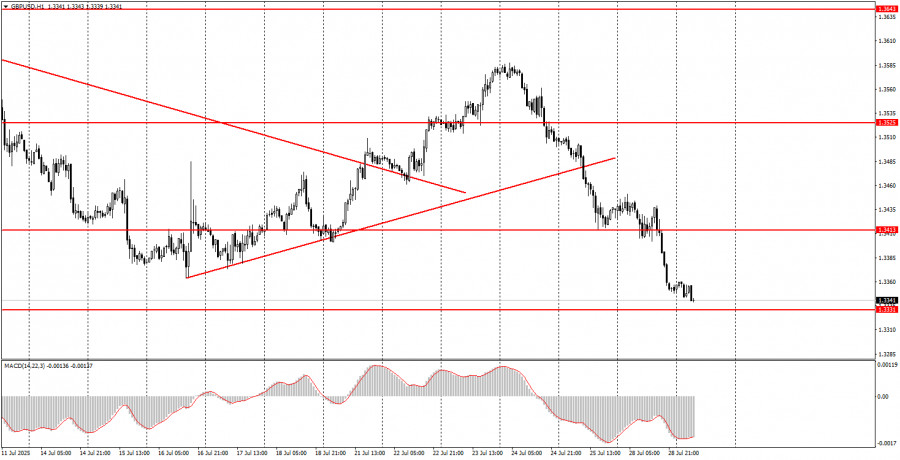
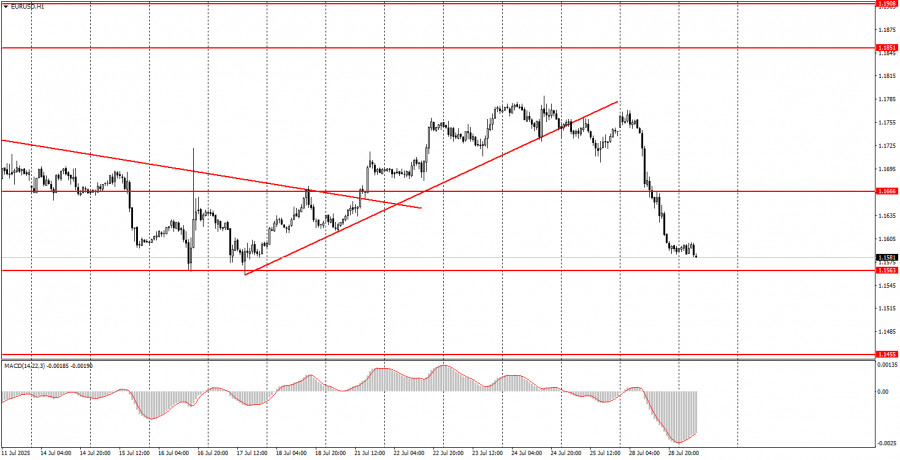
А new instrument of modern trader due to which technical analysis becomes even more understandable
(Click on the chart to get the detailed view)


Your IP address shows that you are currently located in the USA. If you are a resident of the United States, you are prohibited from using the services of InstaFintech Group including online trading, online transfers, deposit/withdrawal of funds, etc.
If you think you are seeing this message by mistake and your location is not the US, kindly proceed to the website. Otherwise, you must leave the website in order to comply with government restrictions.
Why does your IP address show your location as the USA?
Please confirm whether you are a US resident or not by clicking the relevant button below. If you choose the wrong option, being a US resident, you will not be able to open an account with InstaForex anyway.
We are sorry for any inconvenience caused by this message.